Preamble
Timetabling data that exists in E10 timetable files are usually sent on to one or more other non-Tes systems, such as student learning management systems, reporting systems, administration systems, and many more. The Tes integration team works with other systems to make sure that the data required to be sent is in the correct format. This document outlines the synchronisation process to CEO Maitland/Newcastle SAS.
While Tes takes all care to ensure any mention to the other system is correct and up to date, it is the user's responsibility to check with the other system prior to an initial sync. If the user becomes aware of any changes to the other system, we would very much appreciate this feedback.
Type of sync
This sync is performed by exporting a txt file that has been correctly formatted, ready uploading into Reporter Pro.
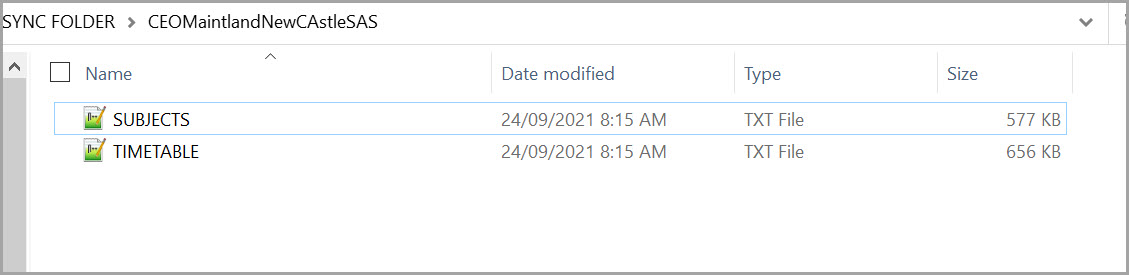
The CEO Maitland/Newcastle SAS export function will export following CSV files:
- Subjects.CSV
- Timetable.CSV
Which data is sent to the other system?
This table lists many of the data and features found in Tes and, where known by Tes specialists, whether they are also understood by the other system.
Note that Tes builds many excellent features to help users build high quality timetables, and while these features can be sent onto the other system through the synchronisation process, not all systems have built the capability on their end to receive/display these feature.
| Tes feature | Notes on feature | Is this feature received by the other system? | Other notes |
| Bell times | Bell times as per Grid structures | No | |
| Campuses | Campuses and their associated rooms | No | |
| Classes | Class Code, Subject name | Yes | |
| Class lists | Yes | ||
| Composite classes (linked classes) | One teacher teaching more than one class at the same time | No | |
| Duty roster | No | ||
| Faculty data | Yes | ||
| Grid structure codes | Yes | ||
| Multi-file | Two (or more) timetable files | Unsure | |
| Multi-grid | Multiple grids with different bell times | No | |
| On-call roster | No | ||
| Priority classes | The priority class that shows on student's timetables where they have class clashes | No | |
| Room data | Room Code | Yes | |
| Rotation classes | Classes from particular rotations | Yes | |
| RTO roster | No | ||
| Student data | Student Code, Name, Year level, Letter group, House | Yes | |
| Study roster | Study classes, staffing and rooming roster | No | |
| Sub-classes | No | ||
| Teacher data | Teacher Code, Name | Yes | |
| Teacher days off (Unavailable) | No | ||
| Timetable data | Yes | ||
| Two (or more) rooms at once | No | ||
| Two (or more) teachers at once | No | ||
| Year levels (non-numeric) | Year levels such as SPT, LSUP, ROLL, Yr9+10 etc.. | Yes |
Steps to Synchronise data
Step 1: Check if any CEO Mainland/NewCastle SAS set up is required
Many systems require some set up prior to receiving timetable data from the timetable. Check with CEO Maitland/Newcastle SAS.
Step 2: Configure the Timetable file
Go to File > Synchronise > Configure
Select the ‘Sync’ sub-tab
Click the '+' and select "CEO Maintland/NewCastle SAS" from the dropdown
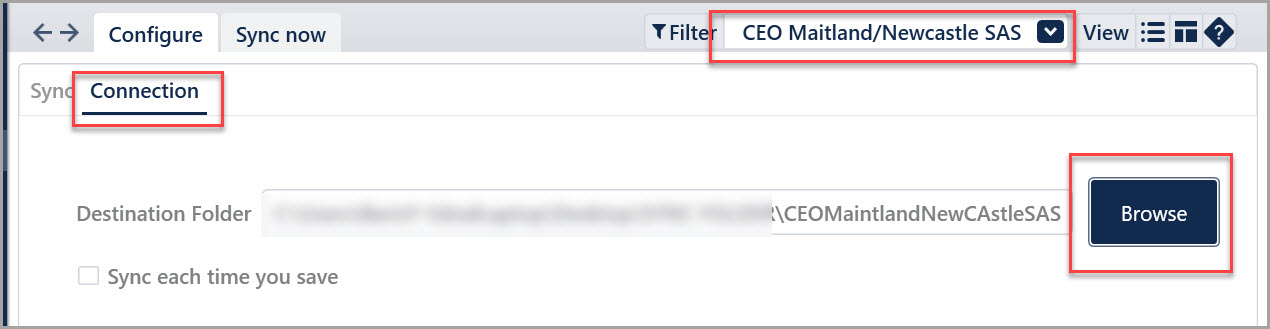
Go to the ‘Connection’ sub-tab
Ensure that “CEO Maintland/NewCastle SAS” is selected in the top-right corner
- In the Connection tab, select Browse to choose the output destination folder on your computer or network.
If you would like to have the files exported every time a save is done, you can tick the 'Sync each time you save' box
Step 3: Perform the sync export
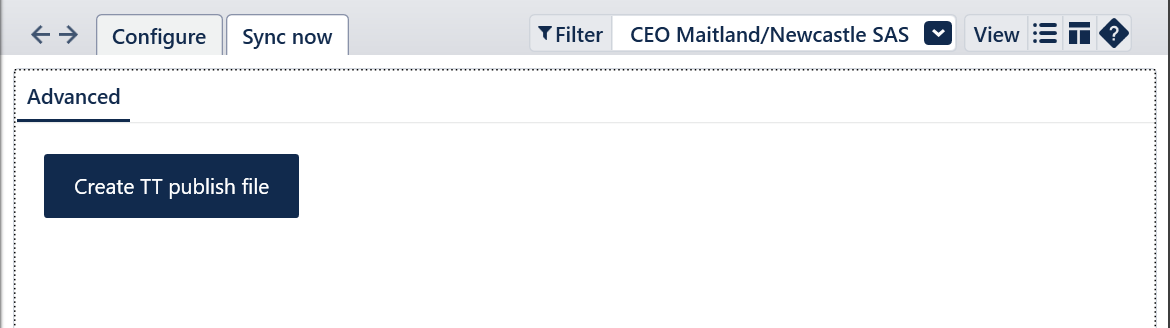
- Go to File > Synchronisation > Sync now.
- Select / ensure that the CEO Maintland/NewCastle SAS option is chosen in the Filter menu in the top right.
- Select Create TT publish file
A number of files will be created which will be used to import into CEO Maitland/Newcastle SAS.
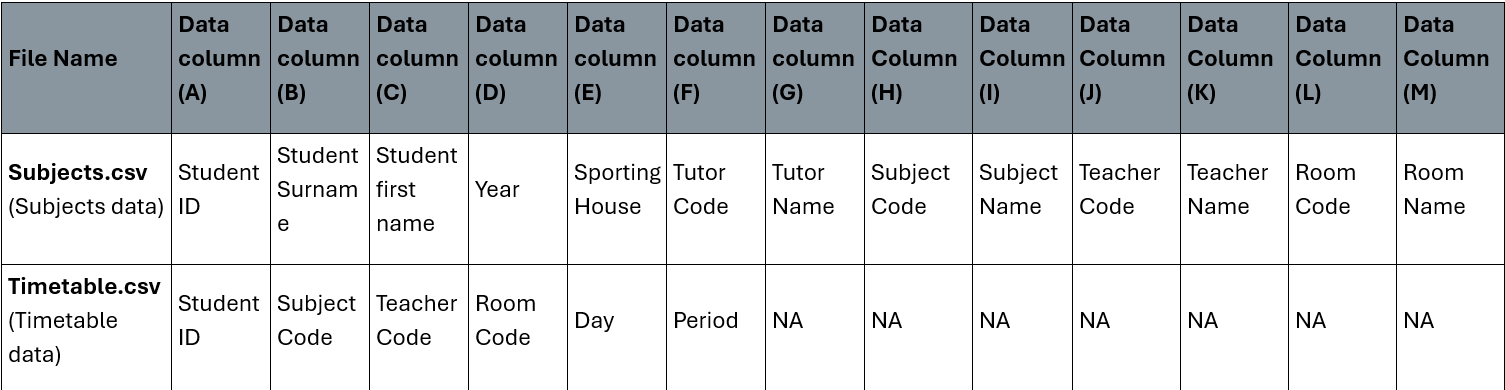
The below table explains what type of data each flat file contains when exported.
For the process on how to import this to CEO Maintland/NewCastle SAS, Please here to contact the CEO Maintland/NewCastle SAS support team.
Was this article helpful?
That’s Great!
Thank you for your feedback
Sorry! We couldn't be helpful
Thank you for your feedback
Feedback sent
We appreciate your effort and will try to fix the article